## installation.mdx
---
title: 'Installation'
description: 'Installing AgentStack is super easy!'
icon: 'cloud-arrow-down'
---
## Installing with Brew
```bash
brew tap agentops-ai/tap
brew install agentstack
```
## Installing with pipx
```bash
pipx install agentstack
```
## Installing with UV
```bash
curl -LsSf https://astral.sh/uv/install.sh | sh
```
```bash
uv venv
```
```bash
uv pip install agentstack
```
## After installing
Run `agentstack --version` to verify that the CLI is installed and accessible.
**Congrats! You now have AgentStack installed in your environment**
A quickstart guide to using the CLI
## quickstart.mdx
---
title: 'Quickstart'
description: 'Start building AI agents in under 5 minutes'
icon: 'circle-play'
---
## Initialize a new project
AgentStack's greatest ability is that of quickly scaffolding agent projects
To start, ensure you have AgentStack [installed](/installation) and run:
```bash
agentstack init
```
**With the Wizard**
Optionally, if you're a little overwhelmed with the code generated, you can use our Wizard to help guide you through some core setup!
```bash
agentstack init --wizard
```
**With a Template**
By default, your project will contain no agents or tasks.
If you find it easier to start with a complete project and edit it to fit your use-case, you can use [Templates](/templates/templates)
```bash
agentstack init --template=
```
## Building your project
AgentStack 0.3 and beyond is framework-agnostic! Choose any supported framework and start building. We help you scaffold your project quickly, but building complex routing and workflows is still done at the framework level. Be sure to understand how to build with your framework and turn to their documentation for guidance.
### Agents
To generate a new agent, run `agentstack generate agent ` - [More Info](/essentials/generating-agents)
### Tasks
To generate a new task, run `agentstack generate task ` - [More Info](/essentials/generating-tasks)
## Quickstart Tutorial
Build a simple web scraper agent
## introduction.mdx
---
title: Introduction
description: 'The easiest way to start your agent project'
icon: 'hand-point-up'
---

 AgentStack is a valuable developer tool for quickly scaffolding agent projects.
_Think `create-next-app` for Agents._
### Features of AgentStack
- Instant project setup with `agentstack init`
- Useful CLI commands for generating new agents and tasks in the development cycle
- A myriad of pre-built tools for Agents
## What is _the agent stack_
The agent stack is the list of tools that are collectively the _agent stack_.
This is similar to the tech stack of a web app. An agent's tech stack is comprised of the following:
AgentStack is a valuable developer tool for quickly scaffolding agent projects.
_Think `create-next-app` for Agents._
### Features of AgentStack
- Instant project setup with `agentstack init`
- Useful CLI commands for generating new agents and tasks in the development cycle
- A myriad of pre-built tools for Agents
## What is _the agent stack_
The agent stack is the list of tools that are collectively the _agent stack_.
This is similar to the tech stack of a web app. An agent's tech stack is comprised of the following:
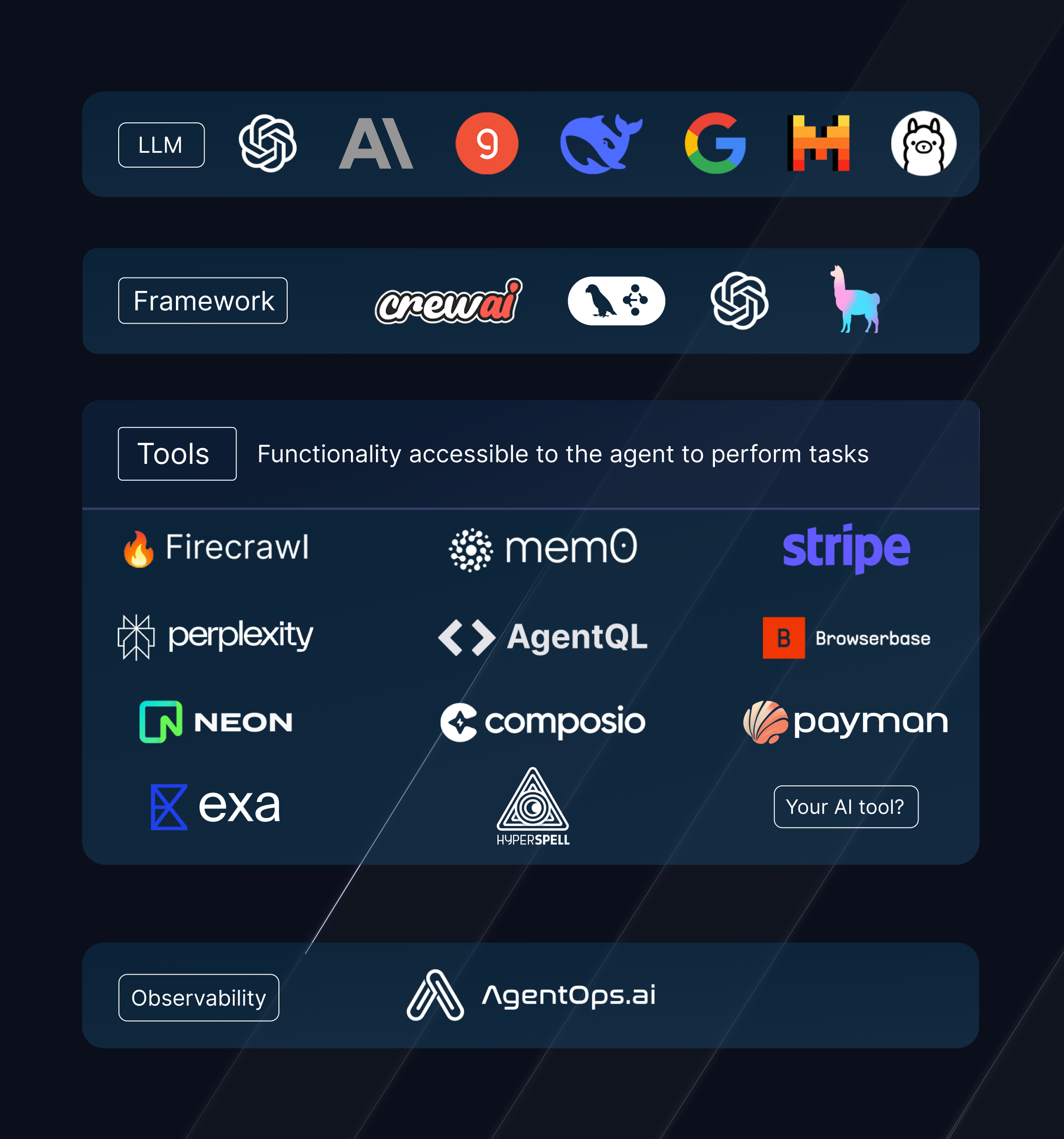 Whether a project is built with AgentStack or not, the concept of the agent stack remains the same.
## What is **AgentStack**
Our project is called **AgentStack** because it's the easiest way to quickly scaffold your agent stack! With a couple CLI commands, you can create a near-production ready agent!
## First Steps
Install the AgentStack CLI
A quickstart guide to using the CLI
High level overview of AgentStack
Build a simple web scraper agent

## cli-reference/cli.mdx
---
title: 'CLI Reference'
description: 'Everything to do with the CLI'
---
It all starts with calling
```bash
$ agentstack
```
### Shortcut Aliases
Many top-level AgentStack commands can be invoked using a single-letter prefix to save keystrokes. These are indicated
in the command's documentation here after a `|` character. Run `agentstack help` for the full list.
### Global Flags
These flags work with all commands:
`--debug` - Print a full traceback when an error is encountered. This also enables printing additional debug information
from within AgentStack useful for development and debugging.
`--path=` - Set the working directory of the current AgentStack project. By default `agentstack` works inside of the
current directory and looks for an `agentstack.json` file there. By passing a path to this flag you can work on a project
from outside of it's directory.
`--version` - Prints the current version and exits.
## `$ agentstack init`
This initializes a new AgentStack project.
```bash
agentstack init
```
`slug_name` is the name of your project, and will be created as a directory to initialize your project inside. When the
default arguments are passed, a starter project template will be used, which adds a single agent, a single task and
demonstrates the use of a tool.
### Init Creates a Virtual Environment
AgentStack creates a new directory, initializes a new virtual environment, installs dependencies, and populates the project
structure. After `init` completes, `cd` into the directory, activate the virtual environment with `source .venv/bin/activate`.
Virtual environments and package management are handled by the `uv` package manager.
### Initializing with the Wizard
You can pass the `--wizard` flag to `agentstack init` to use an interactive project configuration wizard.
### Initializing from a Template
You can also pass a `--template=` argument to `agentstack init` which will pre-populate your project with functionality
from a built-in template, or one found on the internet. A `template_name` can be one of three identifiers:
- A built-in AgentStack template (see the `templates` directory in the AgentStack repo for bundled templates).
- A template file from the internet; pass the full https URL of the template.
- A local template file; pass an absolute or relative path.
## `$ agentstack run`
This runs your AgentStack project.
```bash
agentstack run
```
Environment variables will be loaded from `~/.env` and from the `.env` file inside your project directory. Make sure you
have enabled your project's `venv` before executing to include all dependencies required.
### Overriding Inputs
Your project defines Inputs which are used to customize the Agent and Task prompts for a specific task. In cases where
using the `inputs.yaml` file to populate data is not flexible enough, `run` can accept value overrides for all defined
inputs. Use `--input-=` to pass data which will only be used on this run.
For example, if you have a key in your `inputs.yaml` file named `topic` and want to override it for this run, you would
use the following command:
```bash
agentstack run --input-topic=Sports
```
### Running other project commands
By default, `run` will call the `main()` function inside your project's `main.py` file. You can pass alternate function
names to run with `--function=`.
## Generate
Code generation commands for automatically creating new agents or tasks.
### `$ agentstack generate agent | agentstack g a`
Generate a new agent
- `agent_name` (required | str) - the name of the agent
- `--role` (optional | str) - Prompt parameter: The role of the agent
- `--goal` (optional | str) - Prompt parameter: The goal of the agent
- `--backstory` (optional | str) - Prompt parameter: The backstory of the agent
- `--llm` (optional | `/`) - Which model to use for this agent
#### Default LLM
All arguments to generate a new Agent are optional. A default LLM can be configured in `agentstack.json`under the
`default_model` setting to populate a provider/model. If you are generating an agent in a project which does not have
a default model set, you will be prompted to configure one.
#### Example
```bash Generate Agent
agentstack generate agent script_writer
```
### `$ agentstack generate task | agentstack g t`
Generate a new task
- `task_name` (required | str) - the name of the task
- `--description` (optional | str) - Prompt parameter: Explain the task in detail
- `--expected_output` (optional | str) - What is the expected output from the agent (ex: data in json format)
- `--agent` (optional | str) - The name of the agent of which to assign the task to (when using Crew in sequential mode)
#### Example
```bash Generate Task
agentstack g t gen_script --description "Write a short film script about secret agents"
```
## Tools
Tools are what make AgentStack powerful. Adding and removing Tools from Agents is easy with this command.
### `$ agentstack tools list | agentstack t l`
Lists all tools available in AgentStack.
### `$ agentstack tools add | agentstack t a`
Shows an interactive interface for selecting which Tool to add and which Agents to add it to.
#### Add a Tool to all Agents
When a tool_name is provided it will be made available to all Agents in the project.
```bash
$ agentstack tools add
```
#### Add a Tool to a single Agent
When an agent_name is provided, the tool will be made available to only that agent.
```bash
$ agentstack tools add --agent=
```
#### Add a Tool to multiple Agents
When a comma-separated list of Agents is passed, the tool will be made available to those agents.
```bash
$ agentstack tools add --agents=,,
```
### `$ agentstack tools remove `
Removes a tool from all Agents in the project.
## Templates
Projects can be exported into a template to facilitate sharing configurations. Re-initialize a project from a template
with `agentstack init --template=`.
### `$ agentstack export `
The current project will be written to a JSON template at the provided filename.
## `$ agentstack update`
Check for updates and allow the user to install the latest release of AgentStack.
## `$ agentstack login`
Authenticate with [agentstack.sh](https://agentstack.sh) for hosted integrations.
## contributing/project-structure.mdx
---
title: 'Project Structure'
description: 'Concepts and Structure of AgentStack'
---
> This document is a work-in-progress as we build to version 0.3 and helps
define the structure of the project that we are aiming to create.
AgentStack is a framework-agnostic toolkit for bootstrapping and managing
AI agents. Out of the box it has support for a number of tools and generates
code to get your project off the ground and deployed to a production environment.
It also aims to provide robust tooling for running and managing agents including
logging, debugging, deployment, and observability via [AgentOps](https://www.agentops.ai/).
Developers with limited agent experience should be able to get an agentic
workflow up and running in a matter of minutes. Developers with more experience
should be able to leverage the tools provided by AgentStack to create more
complex workflows and deploy them to production with ease.
# Concepts
## Projects
A project is a user's implementation of AgentStack that is used to implement
and agentic workflow. This is a directory the `agentstack` shell command is
executed from.
## Frameworks
Frameworks are the target platforms that `agentstack` can generate code for.
We don't implement all of the functionality provided by a framework, but instead
leverage them to create agentic workflows and provide tooling to aid in their
creation and operation. [Documented in Frameworks](#frameworks-1)
## Tools
Tools are implementations from useful third party libraries that are provided
to Agents in the user's project. AgentStack handles implementation details and
dependency management for these tools. [Documented in Tools](#tools-1)
## Runtime
When a user initiates `agentstack run` the runtime is the environment that is
created to execute the tasks in the project. This includes the environment
variables, the tools that are available, and the agents that are available to
perform work. The [Public API](#public-api) is available to the user's project
at runtime.
### Environment
The environment is the set of variables that are available to the project. The
user's `~/.env` file is loaded first, and then the project's `.env` file is loaded
to override any variables specific to the project.
# Public API
The public API is available inside of a project after declaring `import agentstack`.
We intentionally keep the exports sparse to maintain a usable module tree inside
the user's project, while only ever importing the single keyword.
## `agentstack.conf.PATH`
`` This is the path to the current project directory.
## `@agentstack.agent`
`` This is a decorator that marks a method as belonging to an Agent.
## `@agentstack.task`
`` This is a decorator that marks a method as belonging to a Task.
## `agentstack.tools[]`
`` This is a tool that is available to agents in the project. Tools
are implementations from useful third party libraries that are provided to Agents
in the user's project. Configuration, dependency management, and wrapper
implementations are provided by AgentStack. Tools implemented at this level are
framework-agnostic and expose useful implementations as `callable`s for agents to
use including docstrings and type hints for argument and return types.
## `agentstack.get_framework()`
`` This is the name of the current framework ie. `"crewai"`.
## `agentstack.get_inputs()`
`` Returns the inputs for a project. These are the
variables that can be used to configure tasks in the project and are stored in the
`inputs.yaml` file inside the project directory.
## `agentstack.get_tags()`
`` Returns the tags for a project. These are strings
that help identify the workflow in an `AgentOps` observability context.
## `agentstack.get_agent(name: str)`
`` Returns the configuration for an agent in the
project. Content of this object originates from the project's `agents.yaml` file.
## `agentstack.get_all_agents()`
`` Returns a list of all the agents in the
project.
## `agentstack.get_all_agent_names()`
`` Returns a list of all the agent names in the project.
## `agentstack.get_task(name: str)`
`` Returns the configuration for a task in the project. Content of this object originates from the project's `tasks.yaml` file.
## `agentstack.get_all_tasks()`
`` Returns a list of all the tasks in the
project.
## `agentstack.get_all_task_names()`
`` Returns a list of all the task names in the project.
# Core
These namespaces occupy the root of `agentstack` and are shared across all
project & frameworks. Methods from these products are generally candidates for
availability in the public API for use within a project.
## `agents`
Agents are the actual personalities that accomplish work. We provide tools for
interacting with the `agents.yaml` configuration file in this package.
### `AgentConfig`
`` This class represents an agent in the project. It is used to
read and modify the `agents.yaml` file.
### Properties
- `name` `` The name of the agent.
- `role` `` The role prompt for the agent.
- `goal` `` The goal prompt for the agent.
- `backstory` `` The backstory prompt for the agent.
- `prompt` `` The full prompt for the agent (formatted role + goal + backstory).
- `llm` `` The LLM to use for the agent (ie. `"openai/gpt-4o"`).
- `provider` `` The provider to use for the agent (ie. `"openai"`).
- `model` `` The model to use for the agent (ie. `"gpt-4o"`).
### Read/Write
Instantiate `AgentConfig` with the name of the agent to read the relevant part
from the user project's `agents.yaml` file.
```python
agent_config = AgentConfig("agent_name")
agent_config.role
```
Use the `AgentConfig` as a context manager to modify and write the relevant part
of the user project's `agents.yaml` file.
```python
with AgentConfig("agent_name") as agent_config:
agent_config.role = "You are a friendly assistant."
```
### `agents.get_agent(name: str)`
`` Shortcut to return an `AgentConfig` object for a given agent name.
### `agents.get_all_agent_names()`
`` Returns a list of all the agent names in the project.
### `agents.get_all_agents()`
`` Returns a list of all the agents in the project.
## `tasks`
Tasks are the individual units of work that an Agent can perform. `agents` will
use the `tools` they have available to accomplish `tasks`. We provide tools for
interacting with the `tasks.yaml` configuration file in this package.
### `TaskConfig`
`` This class represents a task in the project. It is used to
read and modify the `tasks.yaml` file.
#### Properties
- `name` `` The name of the task.
- `description` `` The description prompt for the task.
- `expected_output` `` The expected output prompt of the task.
- `prompt` `` The full prompt for the task (formatted description + expected output).
- `agent` `` The agent name to use for the task.
#### Read/Write
Instantiate `TaskConfig` with the name of the task to read the relevant part
from the user project's `tasks.yaml` file.
```python
task_config = TaskConfig("task_name")
task_config.description
```
Use the `TaskConfig` as a context manager to modify and write the relevant part
of the user project's `tasks.yaml` file.
```python
with TaskConfig("task_name") as task_config:
task_config.description = "How many R's are in strawberry."
```
### `tasks.get_task(name: str)`
`` Initialize a `TaskConfig` to read and modify `tasks.yaml` in the
current project.
### `tasks.get_all_task_names()`
`` Returns a list of all the task names in the project.
### `tasks.get_all_tasks()`
`` Returns a list of all the tasks in the project.
## `inputs`
Inputs are variable data that can be used to configure `tasks`. Behind the scenes
`inputs` are interpolated into `task` prompts to determine their specialization.
We provide tools for interacting with the `inputs.yaml` configuration file in this
package.
> TODO: Iterable inputs that can be used to generate `tasks` for multiple sequential runs.
### `InputsConfig.__init__(name: str)`
`` Initialize an `InputsConfig` to read and modify `inputs.yaml` in
the current project.
#### `InputsConfig.__getitem__(key: str)`
`` Instance method to get the value of an input from the `inputs.yaml` file.
#### `InputsConfig.__setitem__(key: str, value: str)`
`` Instance method to set the value of an input in the `inputs.yaml` file.
### `inputs.get_inputs()`
`` This function returns the inputs for a project.
### `inputs.add_input_for_run(key: str, value: str)`
`` This function adds an input for a run to the `inputs.yaml` file. A run
is the current execution of the `agentstack` command (ie. `agentstack run --inputs-foo=bar`)
and inputs set here will not be saved to the project state.
## `templates`
Templates are configuration data stored in a JSON file that can be used to
generate an entire project. This is useful for bootstrapping a new project
which adheres to a common pattern or exporting your project to share.
Templates are versioned, and each previous version provides a method to convert
it's content to the current version.
### `TemplateConfig.from_user_input(identifier: str)`
`` Returns a `TemplateConfig` object for either a URL, file path,
or builtin template name.
### `TemplateConfig.from_template_name(name: str)`
`` Returns a `TemplateConfig` object for a given template name.
### `TemplateConfig.from_file(path: Path)`
`` Returns a `TemplateConfig` object for a given template file path.
### `TemplateConfig.from_url(url: str)`
`` Returns a `TemplateConfig` object after loading data from a URL.
### `TemplateConfig.from_json(data: dict)`
`` Returns a `TemplateConfig` object from a parsed JSON object.
### `TemplateConfig.write_to_file(filename: Path)`
`` Instance method to serialize and write the `TemplateConfig` data to a file.
### `templates.get_all_template_paths()`
`` This function returns a list of all the template paths in the project.
### `templates.get_all_template_names()`
`` This function returns a list of all the template names in the project.
### `templates.get_all_templates()`
`` This function returns a list of all the templates in the
project as `TemplateConfig` objects.
## `graph`
We implement basic abstractions for graphing the relationships between `agents` and `tasks` in a project.
## `conf`
Configuration data for the AgentStack application. This includes the path to the
current project directory and the name of the current framework.
### `DEBUG`
`` This is a flag that indicates whether the application is in debug mode.
### `set_debug(debug: bool)`
`` This function sets the debug mode for the application.
### `PATH`
`` This is the path to the current project directory. It may change
during program execution, so always use `conf.PATH` to reference the global value.
### `set_path(path: Path)`
`` This function sets the path to the current project directory.
### `ConfigFile`
This is the configuration file for a user's project. It contains the project's
configuration and metadata and is read from `agentstack.json` in the user's
project directory.
#### Read/Write
Instantiate `ConfigFile` to read the relevant part from the user project's
`agentstack.json` file.
```python
config = ConfigFile()
config.framework
```
Use the `ConfigFile` as a context manager to modify and write the relevant part
of the user project's `agentstack.json` file.
```python
with ConfigFile() as config:
config.framework = "crewai"
```
## `log`
AgentStack logs to `stdout/stderr` if available, and to `agentstack.log` in the
current project directory, if it exists.
### Log Handlers
`debug`, `tool_use`, `thinking`, `info`, `notify`, `success`, `response`,
`warning` and `error` are available as functions to log messages at the
appropriate level.
```python
log.debug("This is a debug message.")
```
### `set_stdout(stream: IO)`
`` This function sets the `stdout` stream for the application. To disable
logging to `stdout`, set the stream to a new `io.StringIO()` object.
### `set_stderr(stream: IO)`
`` This function sets the `stderr` stream for the application. To disable
logging to `stderr`, set the stream to a new `io.StringIO()` object.
## `serve`
Completed agents can be deployed to the AgentStack cloud service with a single
command. This provides a fast, secure, and publicly available interface for your
agentic workflows.
> TODO: This is under development.
## `cli`
The command line interface for `agentstack` is provided in this package. Outside
of `main.py` all logic relating to the command line interface resides here.
Typically, functionality inside the `cli` package handles user input and
output, error messaging and status updates.
## `packaging`
We manage the virtual environment and dependencies for tools that are added to
the project, in addition to keeping AgentStack up-to-date.
## `update`
Auto-updates for AgentStack.
# Tools
> TODO: Tools should be documented here, or in sub-pages of documentation for
an overview of their usage.
# Generation
AgentStack generates code for a number of frameworks. The generated code is
a starting point for a user's project and is meant to be modified and extended
to suit the user's needs.
## `generation.agents`
This is code that creates and modifies the `agents` in a user's project. Agents
include code that is part of a framework-specific entrypoint file.
> TODO: Rename `generation.agent_generation` to `generation.agents`.
## `generation.tasks`
This is code that creates and modifies the `tasks` in a user's project. Tasks
include code that is part of a framework-specific entrypoint file.
> TODO: Rename `generation.task_generation` to `generation.tasks`.
## `generation.tools`
This is code that creates and modifies the `tools` in a user's project. Tools
are imported into the project and available for use by `agents`.
> TODO: Rename `generation.tool_generation` to `generation.tools`.
## `generation.files`
This is code that creates and modifies the `files` in a user's project.
### `EnvFile`
This is the environment file for a user's project. It contains the project's
environment variables. We dynamically modify this file to include relevant
variables to support `tools` that are used in the project.
### `ProjectFile`
## `generation.asttools`
Since we're interacting with generated code, we provide a shared toolkit for
common AST operations.
# Frameworks
AgentStack generates code for a number of frameworks. The generated code is
a starting point for a user's project and is meant to be modified and extended
to suit the user's needs. The `frameworks` package contains code that adapts
general interactions with a framework into a specific implementation.
## `frameworks.FrameworkModule`
This is the base protocol for all framework implementations– all implementations
must implement this protocol.
## `frameworks.crewai`
This is the implementation for the CrewAI framework. All code related specifically
to CrewAI is contained in this package.
## `frameworks.langgraph`
This is the implementation for the LangGraph framework. All code related specifically
to LangGraph is contained in this package.
## `frameworks.openai_swarms`
This is the implementation for the OpenAI Swarms framework. All code related specifically
to OpenAI Swarms is contained in this package.
## `frameworks.llamaindex`
. TODO : Add [LlamaIndex](https://docs.llamaindex.ai/en/stable/examples/agent/custom_agent/)
as a framework.
## `frameworks.agency_swarm`
> TODO: Add [VRSEN Agency Swarm](https://github.com/VRSEN/agency-swarm?tab=readme-ov-file)
as a framework.
## contributing/how-to-contribute.mdx
---
title: 'How To Contribute'
description: 'Contribute your own Agent tool to the ecosystem'
---
First of all, __thank you__ for your interest in contributing to AgentStack! Even the smallest contributions help a _ton_.
Our vision is to build the de facto CLI for quickly spinning up an AI Agent project. We want to be the [create-react-app](https://create-react-app.dev/) of agents. Our inspiration also includes the oh-so-convenient [Angular CLI](https://v17.angular.io/cli).
## How to Help
Grab an issue from the [issues tab](https://github.com/AgentOps-AI/AgentStack/issues)! Plenty are labelled "Good First Issue". Fork the repo and create a PR when ready!
The best place to engage in conversation about your contribution is in the Issue chat or on our [Discord](https://discord.gg/JdWkh9tgTQ).
## Setup
1. `git clone https://github.com/AgentOps-AI/AgentStack.git`
`cd AgentStack`
2. `uv pip install -e ".[dev,test]`
- This will install the CLI locally and in editable mode so you can use `agentstack ` to test your latest changes
- Note that after you initialize a project, it will install it's own version of `agentstack` in the project's
virtual environment. To use your local version, run `uv pip install -e "../AgentStack/.[]"` to get
your development version inside of the project, too.
## Project Structure
A detailed overview of the project structure is available at [Project Structure](https://docs.agentstack.sh/contributing/project-structure).
## Before Making a Pull Request
Make sure tests pass, type checking is correct, and ensure your code is formatted correctly.
1. `tox -m quick`
- This will run tests for Python version 3.12 only. You can run tests on all supported versions with `tox`.
2. `mypy agentstack`
- Please resolve all type checking errors before marking your PR as ready for review.
3. `ruff`
- We use `ruff` to ensure consistency in our codebase.
## Tests
We're actively working toward increasing our test coverage. Make sure to review the `codecov` output of your
tests to ensure your contribution is well tested. We use `tox` to run our tests, which sets up individual
environments for each framework and Python version we support. Tests are run when a PR is pushed to, and
contributions without passing tests will not be merged.
You can test a specific Python version and framework by running: `tox -e py312-`, but keep in mind
that the coverage report will be incomplete.
## contributing/adding-tools.mdx
---
title: 'Adding Tools'
description: 'Contribute your own Agent tool to the ecosystem'
---
If you're reading this section, you probably have a product that AI agents can use as a tool. We're glad you're here!
Adding tools is easy once you understand the project structure. A few things need to be done for a tool to be considered completely supported:
- Create a new tool config at `agentstack/_tools//config.json`
- As an example, look at our [tool config fixture](https://github.com/AgentOps-AI/AgentStack/blob/main/tests/fixtures/tool_config_max.json)
- AgentStack uses this to know what code to insert where. Follow the structure to add your tool.
- In `agentstack/_tools`, you'll see other implementations of tools.
- Create a file `agentstack/_tools//__init__.py`,
- Build your tool implementation simply as python functions in this file. The functions that are to be exposed to the agent as a *tool* should contain detailed docstrings and have typed parameters.
- The tools that are exported from this file should be listed in the tool's config json.
Manually test your tool integration by running `agentstack tools add ` and ensure it behaves as expected.
This must be done within an AgentStack project. To create your test project, run `agentstack init test_proj`, then `cd` into the project and try adding your tool.
# Tool Config
- `name` (str) - Name of your tool
- `category` (str) - Category your tool belongs in
- `tools` (List[str]) - The exported functions within your tool file
- `url` (str) - URL to where developers can learn more about your tool
- `tools_bundled` (bool) - True if the tool file exports a list of tools
- `cta` (str) - Call To Action printed in the terminal after install
- `env` (dict) - Key: Environment variable name; Value: default value
- `packages` (List[str]) - Python packages to be installed to support your tool
- `post_install` (str) - A script to be run after install of your tool
- `post_remove` (str) - A script to be run after removal of your tool
## frameworks/list.mdx
---
title: Frameworks
description: 'Supported frameworks in AgentStack'
icon: 'ship'
---
These are documentation links to the frameworks supported directly by AgentStack.
To start a project with one of these frameworks, use
```bash
agentstack init --framework
```
## Framework Docs
An intuitive agentic framework (recommended)
A complex but capable framework with a _steep_ learning curve
A simple framework with a cult following
An expansive framework with many ancillary features
## templates/content_creator.mdx
---
title: 'Content Creator'
description: 'Research a topic and create content on it'
---
[View Template](https://github.com/AgentOps-AI/AgentStack/blob/main/agentstack/templates/content_creator.json)
## templates/templates.mdx
---
title: 'Templates'
description: 'Default AgentStack templates'
---
_Templates are a really powerful tool within AgentStack!_
# Start a new project with a template
Initializing a new project with AgentStack involves adding just one argument:
```bash
agentstack init --template=
```
Templates can also be passed as a URL. The URL should serve a valid json AgentStack template.
## Start Easier
If you're struggling to get started with a project in AgentStack, a great way to better understand what to do is to start with a template!
## Churn Faster
Many contractors that build agent systems have a tried and true prompting method that they want to replicate more quickly.
By creating your own template, you can quickly start projects that adhere to your design.
## For Content Creators
Have a tutorial you've created using AgentStack? Make your project available as a quickstart with templates.
# Built-In Templates
The following templates are built into the AgentStack project. Template contributions are welcome!
Research and report result from a query
Research a topic and create content on it
Inspect a project directory and improve it
## templates/system_analyzer.mdx
---
title: 'System Analyzer'
description: 'Inspect a project directory and improve it'
---
[View Template](https://github.com/AgentOps-AI/AgentStack/blob/main/agentstack/templates/system_analyzer.json)
```bash
agentstack init --template=system_analyzer
```
# Purpose
This agent will accept a query as a string, use Perplexity to research it. Another agent will take the data gathered and perform an analysis focused on answering the query.
# Inputs
`system_path` (str): the absolute path to
## templates/researcher.mdx
---
title: 'Researcher'
description: 'Research and report result from a query'
---
[View Template](https://github.com/AgentOps-AI/AgentStack/blob/main/agentstack/templates/research.json)
```bash
agentstack init --template=research
```
# Purpose
This agent will accept a query as a string, use Perplexity to research it. Another agent will take the data gathered and perform an analysis focused on answering the query.
# Inputs
`query` (str): the query for the agent to research and report on
## templates/community.mdx
---
title: 'Community Templates'
description: 'Extending templating outside what is in the repo'
---
The easiest way to create your own templates right now is to host them online.
```bash
agentstack init --template=
```
Much more community template support coming soon!
## snippets/snippet-intro.mdx
One of the core principles of software development is DRY (Don't Repeat
Yourself). This is a principle that apply to documentation as
well. If you find yourself repeating the same content in multiple places, you
should consider creating a custom snippet to keep your content in sync.
## essentials/agentops.mdx
---
title: '🖇️ AgentOps'
description: 'Using AgentOps makes the agent development process manageable'
---
## Overview
AgentOps provides monitoring for agents in development and production.
It provides a dashboard for tracking agent performance, session replays, and custom reporting.
Additionally, AgentOps provides session drilldowns for viewing agent interactions, LLM calls, and tool usage in real-time.
This feature is useful for debugging and understanding how agents interact with users as well as other agents.

## Features
- **LLM Cost Management and Tracking**: Track spend with foundation model providers.
- **Replay Analytics**: Watch step-by-step agent execution graphs.
- **Recursive Thought Detection**: Identify when agents fall into infinite loops.
- **Custom Reporting**: Create custom analytics on agent performance.
- **Analytics Dashboard**: Monitor high-level statistics about agents in development and production.
- **Public Model Testing**: Test your agents against benchmarks and leaderboards.
- **Custom Tests**: Run your agents against domain-specific tests.
- **Time Travel Debugging**: Restart your sessions from checkpoints.
- **Compliance and Security**: Create audit logs and detect potential threats such as profanity and PII leaks.
- **Prompt Injection Detection**: Identify potential code injection and secret leaks.
## Using AgentOps
AgentOps is baked into AgentStack projects by default! You only need to add an API key to your .env file to unlock observability for free.
Create a user API key here: [Create API Key](https://app.agentops.ai/account)
Add your API key to your environment variables:
```bash
AGENTOPS_API_KEY=
```
## Further Information
To get started, create an [AgentOps account](https://agentops.ai/?=agentstack).
For feature requests or bug reports, please reach out to the AgentOps team on the [AgentOps Repo](https://github.com/AgentOps-AI/agentops).
## essentials/generating-tasks.mdx
---
title: 'Generating Tasks'
description: 'CLI command to add a task to your project'
---
To generate a new task for your project, run:
```bash
agentstack generate task
```
This command will modify two files, your agent file (`crew.py`/`graph.py`) and `agents.yaml`.
## your agent file
This is the file that declares each of your agents and tasks. It's the core of your AgentStack project and how AgentStack configures your framework.
- Crew projects have `crew.py`
- LangGraph projects have `graph.py`
## agents.yaml
This is your prompt file. Any prompt engineering is abstracted to here for non-technical ease.
Each task has two prompt params:
- Description
- Expected Output
And one configuration param:
- Agent - If operating in Sequential mode, this tells the Crew which agent should accomplish the task
## essentials/generating-agents.mdx
---
title: 'Generating Agents'
description: 'CLI command to add an agent to your project'
---
To generate a new agent for your project, run:
```bash
agentstack generate agent
```
This command will modify two files, your agent file (`crew.py` / `graph.py`) and `agents.yaml`.
## your agent file
This is the file that declares each of your agents and tasks. It's the core of your AgentStack project and how AgentStack configures your framework.
- Crew projects have `crew.py`
- LangGraph projects have `graph.py`
## agents.yaml
This is your prompt file. Any prompt engineering is abstracted to here for non-technical ease.
Each agent has three prompt params:
- Role
- Goal
- Backstory
And one configuration param:
- LLM - This value tells AgentStack which model to use for this specific agent. It must be in `/` format
Ex: `openai/gpt-4o`
## tools/core.mdx
---
title: 'Core Tools'
description: 'AgentStack tools that are not third-party integrations'
---
## File System
- [Directory Search](/tools/tool/dir_search)
- [File Read](/tools/tool/file_read)
- [FTP](/tools/tool/ftp)
## Code Execution
- [Code Interpreter](/tools/tool/code-interpreter)
## Input
- [Vision](/tools/tool/vision)
## Data
- [SQL](/tools/tool/sql)
Third party tools from the Agent Community
## tools/tools.mdx
---
title: 'Tools'
description: 'Giving your agents tools should be easy'
---
## Installation
Once you find the right tool for your use-case, install it with simply
```bash
agentstack tools add
```
You can also specify a tool, and one or more agents to install it to:
```bash
agentstack tools add --agents=,
```
Add your own tool to the AgentStack repo [here](/contributing/adding-tools)!
## tools/package-structure.mdx
## Tool Configuration
Each tool gets a directory inside `agentstack/_tools/` where the tool's
source code and configuration will be stored.
The directory should contain the following files:
`config.json`
-------------
This contains the configuration for the tool for use by AgentStack, including
metadata, dependencies, configuration & functions exposed by the tool.
`__init__.py`
---------
Python package which contains the framework-agnostic tool implementation. Tools
are simple packages which exponse functions; when a tool is loaded into a user's
project, it will be wrapped in the framework-specific tool format by AgentStack.
`config.json` Format
--------------------
### `name` (string) [required]
The name of the tool in snake_case. This is used to identify the tool in the system.
### `url` (string) [optional]
The URL of the tool's repository. This is provided to the user to allow them to
learn more about the tool.
### `category` (string) [required]
The category of the tool. This is used to group tools together in the CLI.
### `cta` (string) [optional]
String to print in the terminal when the tool is installed that provides a call to action.
### `env` (list[dict(str, Any)]) [optional]
Definitions for environment variables that will be appended to the local `.env` file.
This is a list of key-value pairs ie. `[{"ENV_VAR": "value"}, ...]`.
In cases where the user is expected to provide their own information, the value is
set to `null` which adds it to the project's `.env` file as a comment.
### `dependencies` (list[str]) [optional]
List of dependencies that will be installed in the user's project. It is
encouraged that versions are specified, which use the `package>=version` format.
### `tools` (list[str]) [required]
List of public functions that are accessible in the tool implementation.
## tools/community.mdx
---
title: 'Community Tools'
description: 'AgentStack tools from community contributors'
---
## Web Retrieval
- [AgentQL](/tools/tool/agentql)
## Browsing
[//]: # (- [Browserbase](/tools/tool/browserbase))
- [Firecrawl](/tools/tool/firecrawl)
## Search
- [Perplexity](/tools/tool/perplexity)
- [Dappier](/tools/tool/dappier)
## Memory / State
- [Mem0](/tools/tool/mem0)
## Database Tools
- [Neon](/tools/tool/neon)
## Code Execution
- [Open Interpreter](/tools/tool/open-interpreter)
## Unified API
- [Composio](/tools/tool/composio)
## Network Protocols
- [Agent Connect](/tools/tool/agent-connect)
## Application Specific
- [Stripe](/tools/tool/stripe)
- [Payman](/tools/tool/payman)
Default tools in AgentStack
Whether a project is built with AgentStack or not, the concept of the agent stack remains the same.
## What is **AgentStack**
Our project is called **AgentStack** because it's the easiest way to quickly scaffold your agent stack! With a couple CLI commands, you can create a near-production ready agent!
## First Steps
Install the AgentStack CLI
A quickstart guide to using the CLI
High level overview of AgentStack

Build a simple web scraper agent

## cli-reference/cli.mdx
---
title: 'CLI Reference'
description: 'Everything to do with the CLI'
---
It all starts with calling
```bash
$ agentstack
```
### Shortcut Aliases
Many top-level AgentStack commands can be invoked using a single-letter prefix to save keystrokes. These are indicated
in the command's documentation here after a `|` character. Run `agentstack help` for the full list.
### Global Flags
These flags work with all commands:
`--debug` - Print a full traceback when an error is encountered. This also enables printing additional debug information
from within AgentStack useful for development and debugging.
`--path=` - Set the working directory of the current AgentStack project. By default `agentstack` works inside of the
current directory and looks for an `agentstack.json` file there. By passing a path to this flag you can work on a project
from outside of it's directory.
`--version` - Prints the current version and exits.
## `$ agentstack init`
This initializes a new AgentStack project.
```bash
agentstack init
```
`slug_name` is the name of your project, and will be created as a directory to initialize your project inside. When the
default arguments are passed, a starter project template will be used, which adds a single agent, a single task and
demonstrates the use of a tool.
### Init Creates a Virtual Environment
AgentStack creates a new directory, initializes a new virtual environment, installs dependencies, and populates the project
structure. After `init` completes, `cd` into the directory, activate the virtual environment with `source .venv/bin/activate`.
Virtual environments and package management are handled by the `uv` package manager.
### Initializing with the Wizard
You can pass the `--wizard` flag to `agentstack init` to use an interactive project configuration wizard.
### Initializing from a Template
You can also pass a `--template=` argument to `agentstack init` which will pre-populate your project with functionality
from a built-in template, or one found on the internet. A `template_name` can be one of three identifiers:
- A built-in AgentStack template (see the `templates` directory in the AgentStack repo for bundled templates).
- A template file from the internet; pass the full https URL of the template.
- A local template file; pass an absolute or relative path.
## `$ agentstack run`
This runs your AgentStack project.
```bash
agentstack run
```
Environment variables will be loaded from `~/.env` and from the `.env` file inside your project directory. Make sure you
have enabled your project's `venv` before executing to include all dependencies required.
### Overriding Inputs
Your project defines Inputs which are used to customize the Agent and Task prompts for a specific task. In cases where
using the `inputs.yaml` file to populate data is not flexible enough, `run` can accept value overrides for all defined
inputs. Use `--input-=` to pass data which will only be used on this run.
For example, if you have a key in your `inputs.yaml` file named `topic` and want to override it for this run, you would
use the following command:
```bash
agentstack run --input-topic=Sports
```
### Running other project commands
By default, `run` will call the `main()` function inside your project's `main.py` file. You can pass alternate function
names to run with `--function=`.
## Generate
Code generation commands for automatically creating new agents or tasks.
### `$ agentstack generate agent | agentstack g a`
Generate a new agent
- `agent_name` (required | str) - the name of the agent
- `--role` (optional | str) - Prompt parameter: The role of the agent
- `--goal` (optional | str) - Prompt parameter: The goal of the agent
- `--backstory` (optional | str) - Prompt parameter: The backstory of the agent
- `--llm` (optional | `/`) - Which model to use for this agent
#### Default LLM
All arguments to generate a new Agent are optional. A default LLM can be configured in `agentstack.json`under the
`default_model` setting to populate a provider/model. If you are generating an agent in a project which does not have
a default model set, you will be prompted to configure one.
#### Example
```bash Generate Agent
agentstack generate agent script_writer
```
### `$ agentstack generate task | agentstack g t`
Generate a new task
- `task_name` (required | str) - the name of the task
- `--description` (optional | str) - Prompt parameter: Explain the task in detail
- `--expected_output` (optional | str) - What is the expected output from the agent (ex: data in json format)
- `--agent` (optional | str) - The name of the agent of which to assign the task to (when using Crew in sequential mode)
#### Example
```bash Generate Task
agentstack g t gen_script --description "Write a short film script about secret agents"
```
## Tools
Tools are what make AgentStack powerful. Adding and removing Tools from Agents is easy with this command.
### `$ agentstack tools list | agentstack t l`
Lists all tools available in AgentStack.
### `$ agentstack tools add | agentstack t a`
Shows an interactive interface for selecting which Tool to add and which Agents to add it to.
#### Add a Tool to all Agents
When a tool_name is provided it will be made available to all Agents in the project.
```bash
$ agentstack tools add
```
#### Add a Tool to a single Agent
When an agent_name is provided, the tool will be made available to only that agent.
```bash
$ agentstack tools add --agent=
```
#### Add a Tool to multiple Agents
When a comma-separated list of Agents is passed, the tool will be made available to those agents.
```bash
$ agentstack tools add --agents=,,
```
### `$ agentstack tools remove `
Removes a tool from all Agents in the project.
## Templates
Projects can be exported into a template to facilitate sharing configurations. Re-initialize a project from a template
with `agentstack init --template=`.
### `$ agentstack export `
The current project will be written to a JSON template at the provided filename.
## `$ agentstack update`
Check for updates and allow the user to install the latest release of AgentStack.
## `$ agentstack login`
Authenticate with [agentstack.sh](https://agentstack.sh) for hosted integrations.
## contributing/project-structure.mdx
---
title: 'Project Structure'
description: 'Concepts and Structure of AgentStack'
---
> This document is a work-in-progress as we build to version 0.3 and helps
define the structure of the project that we are aiming to create.
AgentStack is a framework-agnostic toolkit for bootstrapping and managing
AI agents. Out of the box it has support for a number of tools and generates
code to get your project off the ground and deployed to a production environment.
It also aims to provide robust tooling for running and managing agents including
logging, debugging, deployment, and observability via [AgentOps](https://www.agentops.ai/).
Developers with limited agent experience should be able to get an agentic
workflow up and running in a matter of minutes. Developers with more experience
should be able to leverage the tools provided by AgentStack to create more
complex workflows and deploy them to production with ease.
# Concepts
## Projects
A project is a user's implementation of AgentStack that is used to implement
and agentic workflow. This is a directory the `agentstack` shell command is
executed from.
## Frameworks
Frameworks are the target platforms that `agentstack` can generate code for.
We don't implement all of the functionality provided by a framework, but instead
leverage them to create agentic workflows and provide tooling to aid in their
creation and operation. [Documented in Frameworks](#frameworks-1)
## Tools
Tools are implementations from useful third party libraries that are provided
to Agents in the user's project. AgentStack handles implementation details and
dependency management for these tools. [Documented in Tools](#tools-1)
## Runtime
When a user initiates `agentstack run` the runtime is the environment that is
created to execute the tasks in the project. This includes the environment
variables, the tools that are available, and the agents that are available to
perform work. The [Public API](#public-api) is available to the user's project
at runtime.
### Environment
The environment is the set of variables that are available to the project. The
user's `~/.env` file is loaded first, and then the project's `.env` file is loaded
to override any variables specific to the project.
# Public API
The public API is available inside of a project after declaring `import agentstack`.
We intentionally keep the exports sparse to maintain a usable module tree inside
the user's project, while only ever importing the single keyword.
## `agentstack.conf.PATH`
`` This is the path to the current project directory.
## `@agentstack.agent`
`` This is a decorator that marks a method as belonging to an Agent.
## `@agentstack.task`
`` This is a decorator that marks a method as belonging to a Task.
## `agentstack.tools[]`
`` This is a tool that is available to agents in the project. Tools
are implementations from useful third party libraries that are provided to Agents
in the user's project. Configuration, dependency management, and wrapper
implementations are provided by AgentStack. Tools implemented at this level are
framework-agnostic and expose useful implementations as `callable`s for agents to
use including docstrings and type hints for argument and return types.
## `agentstack.get_framework()`
`` This is the name of the current framework ie. `"crewai"`.
## `agentstack.get_inputs()`
`` Returns the inputs for a project. These are the
variables that can be used to configure tasks in the project and are stored in the
`inputs.yaml` file inside the project directory.
## `agentstack.get_tags()`
`` Returns the tags for a project. These are strings
that help identify the workflow in an `AgentOps` observability context.
## `agentstack.get_agent(name: str)`
`` Returns the configuration for an agent in the
project. Content of this object originates from the project's `agents.yaml` file.
## `agentstack.get_all_agents()`
`` Returns a list of all the agents in the
project.
## `agentstack.get_all_agent_names()`
`` Returns a list of all the agent names in the project.
## `agentstack.get_task(name: str)`
`` Returns the configuration for a task in the project. Content of this object originates from the project's `tasks.yaml` file.
## `agentstack.get_all_tasks()`
`` Returns a list of all the tasks in the
project.
## `agentstack.get_all_task_names()`
`` Returns a list of all the task names in the project.
# Core
These namespaces occupy the root of `agentstack` and are shared across all
project & frameworks. Methods from these products are generally candidates for
availability in the public API for use within a project.
## `agents`
Agents are the actual personalities that accomplish work. We provide tools for
interacting with the `agents.yaml` configuration file in this package.
### `AgentConfig`
`` This class represents an agent in the project. It is used to
read and modify the `agents.yaml` file.
### Properties
- `name` `` The name of the agent.
- `role` `` The role prompt for the agent.
- `goal` `` The goal prompt for the agent.
- `backstory` `` The backstory prompt for the agent.
- `prompt` `` The full prompt for the agent (formatted role + goal + backstory).
- `llm` `` The LLM to use for the agent (ie. `"openai/gpt-4o"`).
- `provider` `` The provider to use for the agent (ie. `"openai"`).
- `model` `` The model to use for the agent (ie. `"gpt-4o"`).
### Read/Write
Instantiate `AgentConfig` with the name of the agent to read the relevant part
from the user project's `agents.yaml` file.
```python
agent_config = AgentConfig("agent_name")
agent_config.role
```
Use the `AgentConfig` as a context manager to modify and write the relevant part
of the user project's `agents.yaml` file.
```python
with AgentConfig("agent_name") as agent_config:
agent_config.role = "You are a friendly assistant."
```
### `agents.get_agent(name: str)`
`` Shortcut to return an `AgentConfig` object for a given agent name.
### `agents.get_all_agent_names()`
`` Returns a list of all the agent names in the project.
### `agents.get_all_agents()`
`` Returns a list of all the agents in the project.
## `tasks`
Tasks are the individual units of work that an Agent can perform. `agents` will
use the `tools` they have available to accomplish `tasks`. We provide tools for
interacting with the `tasks.yaml` configuration file in this package.
### `TaskConfig`
`` This class represents a task in the project. It is used to
read and modify the `tasks.yaml` file.
#### Properties
- `name` `` The name of the task.
- `description` `` The description prompt for the task.
- `expected_output` `` The expected output prompt of the task.
- `prompt` `` The full prompt for the task (formatted description + expected output).
- `agent` `` The agent name to use for the task.
#### Read/Write
Instantiate `TaskConfig` with the name of the task to read the relevant part
from the user project's `tasks.yaml` file.
```python
task_config = TaskConfig("task_name")
task_config.description
```
Use the `TaskConfig` as a context manager to modify and write the relevant part
of the user project's `tasks.yaml` file.
```python
with TaskConfig("task_name") as task_config:
task_config.description = "How many R's are in strawberry."
```
### `tasks.get_task(name: str)`
`` Initialize a `TaskConfig` to read and modify `tasks.yaml` in the
current project.
### `tasks.get_all_task_names()`
`` Returns a list of all the task names in the project.
### `tasks.get_all_tasks()`
`` Returns a list of all the tasks in the project.
## `inputs`
Inputs are variable data that can be used to configure `tasks`. Behind the scenes
`inputs` are interpolated into `task` prompts to determine their specialization.
We provide tools for interacting with the `inputs.yaml` configuration file in this
package.
> TODO: Iterable inputs that can be used to generate `tasks` for multiple sequential runs.
### `InputsConfig.__init__(name: str)`
`` Initialize an `InputsConfig` to read and modify `inputs.yaml` in
the current project.
#### `InputsConfig.__getitem__(key: str)`
`` Instance method to get the value of an input from the `inputs.yaml` file.
#### `InputsConfig.__setitem__(key: str, value: str)`
`` Instance method to set the value of an input in the `inputs.yaml` file.
### `inputs.get_inputs()`
`` This function returns the inputs for a project.
### `inputs.add_input_for_run(key: str, value: str)`
`` This function adds an input for a run to the `inputs.yaml` file. A run
is the current execution of the `agentstack` command (ie. `agentstack run --inputs-foo=bar`)
and inputs set here will not be saved to the project state.
## `templates`
Templates are configuration data stored in a JSON file that can be used to
generate an entire project. This is useful for bootstrapping a new project
which adheres to a common pattern or exporting your project to share.
Templates are versioned, and each previous version provides a method to convert
it's content to the current version.
### `TemplateConfig.from_user_input(identifier: str)`
`` Returns a `TemplateConfig` object for either a URL, file path,
or builtin template name.
### `TemplateConfig.from_template_name(name: str)`
`` Returns a `TemplateConfig` object for a given template name.
### `TemplateConfig.from_file(path: Path)`
`` Returns a `TemplateConfig` object for a given template file path.
### `TemplateConfig.from_url(url: str)`
`` Returns a `TemplateConfig` object after loading data from a URL.
### `TemplateConfig.from_json(data: dict)`
`` Returns a `TemplateConfig` object from a parsed JSON object.
### `TemplateConfig.write_to_file(filename: Path)`
`` Instance method to serialize and write the `TemplateConfig` data to a file.
### `templates.get_all_template_paths()`
`` This function returns a list of all the template paths in the project.
### `templates.get_all_template_names()`
`` This function returns a list of all the template names in the project.
### `templates.get_all_templates()`
`` This function returns a list of all the templates in the
project as `TemplateConfig` objects.
## `graph`
We implement basic abstractions for graphing the relationships between `agents` and `tasks` in a project.
## `conf`
Configuration data for the AgentStack application. This includes the path to the
current project directory and the name of the current framework.
### `DEBUG`
`` This is a flag that indicates whether the application is in debug mode.
### `set_debug(debug: bool)`
`` This function sets the debug mode for the application.
### `PATH`
`` This is the path to the current project directory. It may change
during program execution, so always use `conf.PATH` to reference the global value.
### `set_path(path: Path)`
`` This function sets the path to the current project directory.
### `ConfigFile`
This is the configuration file for a user's project. It contains the project's
configuration and metadata and is read from `agentstack.json` in the user's
project directory.
#### Read/Write
Instantiate `ConfigFile` to read the relevant part from the user project's
`agentstack.json` file.
```python
config = ConfigFile()
config.framework
```
Use the `ConfigFile` as a context manager to modify and write the relevant part
of the user project's `agentstack.json` file.
```python
with ConfigFile() as config:
config.framework = "crewai"
```
## `log`
AgentStack logs to `stdout/stderr` if available, and to `agentstack.log` in the
current project directory, if it exists.
### Log Handlers
`debug`, `tool_use`, `thinking`, `info`, `notify`, `success`, `response`,
`warning` and `error` are available as functions to log messages at the
appropriate level.
```python
log.debug("This is a debug message.")
```
### `set_stdout(stream: IO)`
`` This function sets the `stdout` stream for the application. To disable
logging to `stdout`, set the stream to a new `io.StringIO()` object.
### `set_stderr(stream: IO)`
`` This function sets the `stderr` stream for the application. To disable
logging to `stderr`, set the stream to a new `io.StringIO()` object.
## `serve`
Completed agents can be deployed to the AgentStack cloud service with a single
command. This provides a fast, secure, and publicly available interface for your
agentic workflows.
> TODO: This is under development.
## `cli`
The command line interface for `agentstack` is provided in this package. Outside
of `main.py` all logic relating to the command line interface resides here.
Typically, functionality inside the `cli` package handles user input and
output, error messaging and status updates.
## `packaging`
We manage the virtual environment and dependencies for tools that are added to
the project, in addition to keeping AgentStack up-to-date.
## `update`
Auto-updates for AgentStack.
# Tools
> TODO: Tools should be documented here, or in sub-pages of documentation for
an overview of their usage.
# Generation
AgentStack generates code for a number of frameworks. The generated code is
a starting point for a user's project and is meant to be modified and extended
to suit the user's needs.
## `generation.agents`
This is code that creates and modifies the `agents` in a user's project. Agents
include code that is part of a framework-specific entrypoint file.
> TODO: Rename `generation.agent_generation` to `generation.agents`.
## `generation.tasks`
This is code that creates and modifies the `tasks` in a user's project. Tasks
include code that is part of a framework-specific entrypoint file.
> TODO: Rename `generation.task_generation` to `generation.tasks`.
## `generation.tools`
This is code that creates and modifies the `tools` in a user's project. Tools
are imported into the project and available for use by `agents`.
> TODO: Rename `generation.tool_generation` to `generation.tools`.
## `generation.files`
This is code that creates and modifies the `files` in a user's project.
### `EnvFile`
This is the environment file for a user's project. It contains the project's
environment variables. We dynamically modify this file to include relevant
variables to support `tools` that are used in the project.
### `ProjectFile`
## `generation.asttools`
Since we're interacting with generated code, we provide a shared toolkit for
common AST operations.
# Frameworks
AgentStack generates code for a number of frameworks. The generated code is
a starting point for a user's project and is meant to be modified and extended
to suit the user's needs. The `frameworks` package contains code that adapts
general interactions with a framework into a specific implementation.
## `frameworks.FrameworkModule`
This is the base protocol for all framework implementations– all implementations
must implement this protocol.
## `frameworks.crewai`
This is the implementation for the CrewAI framework. All code related specifically
to CrewAI is contained in this package.
## `frameworks.langgraph`
This is the implementation for the LangGraph framework. All code related specifically
to LangGraph is contained in this package.
## `frameworks.openai_swarms`
This is the implementation for the OpenAI Swarms framework. All code related specifically
to OpenAI Swarms is contained in this package.
## `frameworks.llamaindex`
. TODO : Add [LlamaIndex](https://docs.llamaindex.ai/en/stable/examples/agent/custom_agent/)
as a framework.
## `frameworks.agency_swarm`
> TODO: Add [VRSEN Agency Swarm](https://github.com/VRSEN/agency-swarm?tab=readme-ov-file)
as a framework.
## contributing/how-to-contribute.mdx
---
title: 'How To Contribute'
description: 'Contribute your own Agent tool to the ecosystem'
---
First of all, __thank you__ for your interest in contributing to AgentStack! Even the smallest contributions help a _ton_.
Our vision is to build the de facto CLI for quickly spinning up an AI Agent project. We want to be the [create-react-app](https://create-react-app.dev/) of agents. Our inspiration also includes the oh-so-convenient [Angular CLI](https://v17.angular.io/cli).
## How to Help
Grab an issue from the [issues tab](https://github.com/AgentOps-AI/AgentStack/issues)! Plenty are labelled "Good First Issue". Fork the repo and create a PR when ready!
The best place to engage in conversation about your contribution is in the Issue chat or on our [Discord](https://discord.gg/JdWkh9tgTQ).
## Setup
1. `git clone https://github.com/AgentOps-AI/AgentStack.git`
`cd AgentStack`
2. `uv pip install -e ".[dev,test]`
- This will install the CLI locally and in editable mode so you can use `agentstack ` to test your latest changes
- Note that after you initialize a project, it will install it's own version of `agentstack` in the project's
virtual environment. To use your local version, run `uv pip install -e "../AgentStack/.[]"` to get
your development version inside of the project, too.
## Project Structure
A detailed overview of the project structure is available at [Project Structure](https://docs.agentstack.sh/contributing/project-structure).
## Before Making a Pull Request
Make sure tests pass, type checking is correct, and ensure your code is formatted correctly.
1. `tox -m quick`
- This will run tests for Python version 3.12 only. You can run tests on all supported versions with `tox`.
2. `mypy agentstack`
- Please resolve all type checking errors before marking your PR as ready for review.
3. `ruff`
- We use `ruff` to ensure consistency in our codebase.
## Tests
We're actively working toward increasing our test coverage. Make sure to review the `codecov` output of your
tests to ensure your contribution is well tested. We use `tox` to run our tests, which sets up individual
environments for each framework and Python version we support. Tests are run when a PR is pushed to, and
contributions without passing tests will not be merged.
You can test a specific Python version and framework by running: `tox -e py312-`, but keep in mind
that the coverage report will be incomplete.
## contributing/adding-tools.mdx
---
title: 'Adding Tools'
description: 'Contribute your own Agent tool to the ecosystem'
---
If you're reading this section, you probably have a product that AI agents can use as a tool. We're glad you're here!
Adding tools is easy once you understand the project structure. A few things need to be done for a tool to be considered completely supported:
- Create a new tool config at `agentstack/_tools//config.json`
- As an example, look at our [tool config fixture](https://github.com/AgentOps-AI/AgentStack/blob/main/tests/fixtures/tool_config_max.json)
- AgentStack uses this to know what code to insert where. Follow the structure to add your tool.
- In `agentstack/_tools`, you'll see other implementations of tools.
- Create a file `agentstack/_tools//__init__.py`,
- Build your tool implementation simply as python functions in this file. The functions that are to be exposed to the agent as a *tool* should contain detailed docstrings and have typed parameters.
- The tools that are exported from this file should be listed in the tool's config json.
Manually test your tool integration by running `agentstack tools add ` and ensure it behaves as expected.
This must be done within an AgentStack project. To create your test project, run `agentstack init test_proj`, then `cd` into the project and try adding your tool.
# Tool Config
- `name` (str) - Name of your tool
- `category` (str) - Category your tool belongs in
- `tools` (List[str]) - The exported functions within your tool file
- `url` (str) - URL to where developers can learn more about your tool
- `tools_bundled` (bool) - True if the tool file exports a list of tools
- `cta` (str) - Call To Action printed in the terminal after install
- `env` (dict) - Key: Environment variable name; Value: default value
- `packages` (List[str]) - Python packages to be installed to support your tool
- `post_install` (str) - A script to be run after install of your tool
- `post_remove` (str) - A script to be run after removal of your tool
## frameworks/list.mdx
---
title: Frameworks
description: 'Supported frameworks in AgentStack'
icon: 'ship'
---
These are documentation links to the frameworks supported directly by AgentStack.
To start a project with one of these frameworks, use
```bash
agentstack init --framework
```
## Framework Docs
An intuitive agentic framework (recommended)
A complex but capable framework with a _steep_ learning curve
A simple framework with a cult following
An expansive framework with many ancillary features
## templates/content_creator.mdx
---
title: 'Content Creator'
description: 'Research a topic and create content on it'
---
[View Template](https://github.com/AgentOps-AI/AgentStack/blob/main/agentstack/templates/content_creator.json)
## templates/templates.mdx
---
title: 'Templates'
description: 'Default AgentStack templates'
---
_Templates are a really powerful tool within AgentStack!_
# Start a new project with a template
Initializing a new project with AgentStack involves adding just one argument:
```bash
agentstack init --template=
```
Templates can also be passed as a URL. The URL should serve a valid json AgentStack template.
## Start Easier
If you're struggling to get started with a project in AgentStack, a great way to better understand what to do is to start with a template!
## Churn Faster
Many contractors that build agent systems have a tried and true prompting method that they want to replicate more quickly.
By creating your own template, you can quickly start projects that adhere to your design.
## For Content Creators
Have a tutorial you've created using AgentStack? Make your project available as a quickstart with templates.
# Built-In Templates
The following templates are built into the AgentStack project. Template contributions are welcome!
Research and report result from a query
Research a topic and create content on it
Inspect a project directory and improve it
## templates/system_analyzer.mdx
---
title: 'System Analyzer'
description: 'Inspect a project directory and improve it'
---
[View Template](https://github.com/AgentOps-AI/AgentStack/blob/main/agentstack/templates/system_analyzer.json)
```bash
agentstack init --template=system_analyzer
```
# Purpose
This agent will accept a query as a string, use Perplexity to research it. Another agent will take the data gathered and perform an analysis focused on answering the query.
# Inputs
`system_path` (str): the absolute path to
## templates/researcher.mdx
---
title: 'Researcher'
description: 'Research and report result from a query'
---
[View Template](https://github.com/AgentOps-AI/AgentStack/blob/main/agentstack/templates/research.json)
```bash
agentstack init --template=research
```
# Purpose
This agent will accept a query as a string, use Perplexity to research it. Another agent will take the data gathered and perform an analysis focused on answering the query.
# Inputs
`query` (str): the query for the agent to research and report on
## templates/community.mdx
---
title: 'Community Templates'
description: 'Extending templating outside what is in the repo'
---
The easiest way to create your own templates right now is to host them online.
```bash
agentstack init --template=
```
Much more community template support coming soon!
## snippets/snippet-intro.mdx
One of the core principles of software development is DRY (Don't Repeat
Yourself). This is a principle that apply to documentation as
well. If you find yourself repeating the same content in multiple places, you
should consider creating a custom snippet to keep your content in sync.
## essentials/agentops.mdx
---
title: '🖇️ AgentOps'
description: 'Using AgentOps makes the agent development process manageable'
---
## Overview
AgentOps provides monitoring for agents in development and production.
It provides a dashboard for tracking agent performance, session replays, and custom reporting.
Additionally, AgentOps provides session drilldowns for viewing agent interactions, LLM calls, and tool usage in real-time.
This feature is useful for debugging and understanding how agents interact with users as well as other agents.

## Features
- **LLM Cost Management and Tracking**: Track spend with foundation model providers.
- **Replay Analytics**: Watch step-by-step agent execution graphs.
- **Recursive Thought Detection**: Identify when agents fall into infinite loops.
- **Custom Reporting**: Create custom analytics on agent performance.
- **Analytics Dashboard**: Monitor high-level statistics about agents in development and production.
- **Public Model Testing**: Test your agents against benchmarks and leaderboards.
- **Custom Tests**: Run your agents against domain-specific tests.
- **Time Travel Debugging**: Restart your sessions from checkpoints.
- **Compliance and Security**: Create audit logs and detect potential threats such as profanity and PII leaks.
- **Prompt Injection Detection**: Identify potential code injection and secret leaks.
## Using AgentOps
AgentOps is baked into AgentStack projects by default! You only need to add an API key to your .env file to unlock observability for free.
Create a user API key here: [Create API Key](https://app.agentops.ai/account)
Add your API key to your environment variables:
```bash
AGENTOPS_API_KEY=
```
## Further Information
To get started, create an [AgentOps account](https://agentops.ai/?=agentstack).
For feature requests or bug reports, please reach out to the AgentOps team on the [AgentOps Repo](https://github.com/AgentOps-AI/agentops).
## essentials/generating-tasks.mdx
---
title: 'Generating Tasks'
description: 'CLI command to add a task to your project'
---
To generate a new task for your project, run:
```bash
agentstack generate task
```
This command will modify two files, your agent file (`crew.py`/`graph.py`) and `agents.yaml`.
## your agent file
This is the file that declares each of your agents and tasks. It's the core of your AgentStack project and how AgentStack configures your framework.
- Crew projects have `crew.py`
- LangGraph projects have `graph.py`
## agents.yaml
This is your prompt file. Any prompt engineering is abstracted to here for non-technical ease.
Each task has two prompt params:
- Description
- Expected Output
And one configuration param:
- Agent - If operating in Sequential mode, this tells the Crew which agent should accomplish the task
## essentials/generating-agents.mdx
---
title: 'Generating Agents'
description: 'CLI command to add an agent to your project'
---
To generate a new agent for your project, run:
```bash
agentstack generate agent
```
This command will modify two files, your agent file (`crew.py` / `graph.py`) and `agents.yaml`.
## your agent file
This is the file that declares each of your agents and tasks. It's the core of your AgentStack project and how AgentStack configures your framework.
- Crew projects have `crew.py`
- LangGraph projects have `graph.py`
## agents.yaml
This is your prompt file. Any prompt engineering is abstracted to here for non-technical ease.
Each agent has three prompt params:
- Role
- Goal
- Backstory
And one configuration param:
- LLM - This value tells AgentStack which model to use for this specific agent. It must be in `/` format
Ex: `openai/gpt-4o`
## tools/core.mdx
---
title: 'Core Tools'
description: 'AgentStack tools that are not third-party integrations'
---
## File System
- [Directory Search](/tools/tool/dir_search)
- [File Read](/tools/tool/file_read)
- [FTP](/tools/tool/ftp)
## Code Execution
- [Code Interpreter](/tools/tool/code-interpreter)
## Input
- [Vision](/tools/tool/vision)
## Data
- [SQL](/tools/tool/sql)
Third party tools from the Agent Community
## tools/tools.mdx
---
title: 'Tools'
description: 'Giving your agents tools should be easy'
---
## Installation
Once you find the right tool for your use-case, install it with simply
```bash
agentstack tools add
```
You can also specify a tool, and one or more agents to install it to:
```bash
agentstack tools add --agents=,
```
Add your own tool to the AgentStack repo [here](/contributing/adding-tools)!
## tools/package-structure.mdx
## Tool Configuration
Each tool gets a directory inside `agentstack/_tools/` where the tool's
source code and configuration will be stored.
The directory should contain the following files:
`config.json`
-------------
This contains the configuration for the tool for use by AgentStack, including
metadata, dependencies, configuration & functions exposed by the tool.
`__init__.py`
---------
Python package which contains the framework-agnostic tool implementation. Tools
are simple packages which exponse functions; when a tool is loaded into a user's
project, it will be wrapped in the framework-specific tool format by AgentStack.
`config.json` Format
--------------------
### `name` (string) [required]
The name of the tool in snake_case. This is used to identify the tool in the system.
### `url` (string) [optional]
The URL of the tool's repository. This is provided to the user to allow them to
learn more about the tool.
### `category` (string) [required]
The category of the tool. This is used to group tools together in the CLI.
### `cta` (string) [optional]
String to print in the terminal when the tool is installed that provides a call to action.
### `env` (list[dict(str, Any)]) [optional]
Definitions for environment variables that will be appended to the local `.env` file.
This is a list of key-value pairs ie. `[{"ENV_VAR": "value"}, ...]`.
In cases where the user is expected to provide their own information, the value is
set to `null` which adds it to the project's `.env` file as a comment.
### `dependencies` (list[str]) [optional]
List of dependencies that will be installed in the user's project. It is
encouraged that versions are specified, which use the `package>=version` format.
### `tools` (list[str]) [required]
List of public functions that are accessible in the tool implementation.
## tools/community.mdx
---
title: 'Community Tools'
description: 'AgentStack tools from community contributors'
---
## Web Retrieval
- [AgentQL](/tools/tool/agentql)
## Browsing
[//]: # (- [Browserbase](/tools/tool/browserbase))
- [Firecrawl](/tools/tool/firecrawl)
## Search
- [Perplexity](/tools/tool/perplexity)
- [Dappier](/tools/tool/dappier)
## Memory / State
- [Mem0](/tools/tool/mem0)
## Database Tools
- [Neon](/tools/tool/neon)
## Code Execution
- [Open Interpreter](/tools/tool/open-interpreter)
## Unified API
- [Composio](/tools/tool/composio)
## Network Protocols
- [Agent Connect](/tools/tool/agent-connect)
## Application Specific
- [Stripe](/tools/tool/stripe)
- [Payman](/tools/tool/payman)
Default tools in AgentStack